
Find a Dealer
Find a Dealer
Rethinking the Toyota dealer map experience.
Rethinking the Toyota dealer map experience.
Lead UX/UI Designer
Lead UX/UI Designer
Jan. 2024
Jan. 2024
May 2024
May 2024
Background
Redesigning Toyota's dealer locator to unify a fragmented map experience across 1,500+ national dealerships.
Redesigning Toyota's dealer locator to unify a fragmented map experience across 1,500+ national dealerships.
Challenge
Toyota's needs a universal map experience that consolidates the five existing maps for different Toyota location types, without compromising the end user experience or visibility of individual dealerships.
Toyota's needs a universal map experience that consolidates the five existing maps for different Toyota location types, without compromising the end user experience or visibility of individual dealerships.
Opportunity
Design an all-encompassing map experience for every type of Toyota location to increase engagement and awareness of different service offerings while simplifying the customer experience.
Design an all-encompassing map experience for every type of Toyota location to increase engagement and awareness of different service offerings while simplifying the customer experience.
Outcome
We successfully consolidated all five maps for different Toyota location types into a singular "Find a Dealer" map experience.
23%
increase in page views for dealer details.
12%
increase in clicks to call dealers.
5%
increase in clicks to schedule service.
Outcome
We successfully consolidated all five maps for different Toyota location types into a singular "Find a Dealer" map experience.
23%
increase in page views for dealership details.
12%
increase in clicks to call dealerships.
5%
increase in clicks to schedule service.
Context
Historically, Toyota.com and Toyota Owners functioned as separate platforms. As stakeholder pressure grew for greater visibility and clearer differentiation between Toyota locations and their offerings, each type of location claimed its own siloed map experience.
Historically, Toyota.com and Toyota Owners functioned as separate platforms. As stakeholder pressure grew for greater visibility and clearer differentiation between Toyota locations and their offerings, each type of location claimed its own siloed map experience.
Toyota.com
One primary, shopper-oriented dealer map. Mobile has separate map and list view.

Toyota Owners
Four maps for owners with different service offerings - Service Centers, Certified Collision Centers, and Express Maintenance.

Map Analytics
Map Analytics
The primary Find a Dealer map (~618K visits/mo.) is the dominant experience, with nearly 1/2 of users engaging, and over a 1/3 clicking the "Dealer Website" CTA. Among owners maps, Service Centers leads in traffic (~112K visits/mo.) while the "Schedule Service" CTA drives the highest CTR. For Collision Centers and Express Maintenance, traffic is lower, but marketing content has high engagement.
The primary Find a Dealer map (~618K visits/mo.) is the dominant experience, with nearly 1/2 of users engaging, and over a 1/3 clicking the "Dealer Website" CTA. Among owners maps, Service Centers leads in traffic (~112K visits/mo.) while the "Schedule Service" CTA drives the highest CTR. For Collision Centers and Express Maintenance, traffic is lower, but marketing content has high engagement.
98.5%
of site-wide clicks for “Dealer Website” come from the primary Find a Dealer map.
of site-wide clicks for “Dealer Website” come from the primary Find a Dealer map.
5%
engage with the Service Center map, and 11% click “Schedule Service”.
engage with the Service Center map, and 11% click “Schedule Service”.
5%
of monthly traffic visit Express Maintenance & Collision Center maps, and 23% interact with PDFs.
of monthly traffic visit Express Maintenance & Collision Center maps, and 23% interact with PDFs.
4%
of monthly traffic visit the Owner’s Find a Dealer map, and 20.7% click “Schedule Service”.
of monthly traffic visit the Owner’s Find a Dealer map, and 20.7% click “Schedule Service”.
Key Takeaways
Key Takeaways
The volume of visits to the primary Find a Dealer outweighs all owners maps, so sales dealers should be prioritized. Based on high engagement with informational PDFs on Certified Collision Centers and Express Maintenance maps, we need to make it more clear to users about the service offerings from these locations.
Map Consolidation Advantages
Map Consolidation Advantages
User Ease and Favorability
User Ease and Favorability
Navigation improvements will drive more users to the information they need.
Navigation improvements will drive more users to the information they need.
Increased Service Exposure
Increased Service Exposure
More visibility within the maps experience will help educate users on Express Maintenance and Collision Centers.
More visibility within the maps experience will help educate users on Express Maintenance and Collision Centers.
Increase in Service Scheduling
Increase in Service Scheduling
More exposure and increased ease-of-use will lead more users to book service and other dealer appointment types.
More exposure and increased ease-of-use will lead more users to book service and other dealer appointment types.
SEO Optimization
SEO Optimization
Improved link structure will lead more users to the correct maps, pages, and locations for specific services.
Improved link structure will lead more users to the correct maps, pages, and locations for specific services.
Usability Observations
Usability Observations
After interpreting analytics, conducting our heuristic analysis, and auditing other best-in-class experiences, we facilitated quick, informal run-throughs of the main map on both desktop and mobile, gathering pain points and translating them into potential needs.
After interpreting analytics, conducting our heuristic analysis, and auditing other best-in-class experiences, we facilitated quick, informal run-throughs of the main map on both desktop and mobile, gathering pain points and translating them into potential needs.
Pain Points We Identified
I had trouble finding the map.
On mobile, I wish I could view the map and list view simultaneously.
I can’t copy/paste the dealer address into 3rd party maps for navigation.
Don't understand differences between Service, Collision Centers and Express Maintenance.
User Needs
Give the map a more prominent location, ideally within global navigation.
Ability to reference both the dealer info and map while using mobile.
Add a copy button or link from the dealer address.
Provide educational content for the different types of service locations.
Pain Points We Identified
I had trouble finding the map.
On mobile, I wish I could view the map and list view simultaneously.
I can’t copy/paste the dealer address into 3rd party maps for navigation.
Don't understand differences between Service, Collision Centers and Express Maintenance.
User Needs
Give the map a more prominent location, ideally within global navigation.
Ability to reference both the dealer info and map while using mobile.
Add a copy button or link from the dealer address.
Provide educational content for the different types of service locations.
Pain Points We Identified
I had trouble finding the map.
On mobile, I wish I could view the map and list view simultaneously.
I can’t copy/paste the dealer address into 3rd party maps for navigation.
Don't understand differences between Service, Collision Centers and Express Maintenance.
User Needs
Give the map a more prominent location, ideally within global navigation.
Ability to reference both the dealer info and map while using mobile.
Add a copy button or link from the dealer address.
Provide educational content for the different types of service locations.
Defining User and Business Goals
Business Requirements
Business Requirements
To identify goals that consider both Toyota as a business and Toyota shoppers and owners, I mapped out goals for each, and any additional technical considerations. The overlapping areas of this diagram identified the project goals, which were taken into account during the design ideation phase. These findings helped shape our problem statement for our two key personas - active vehicle shoppers (~60% of users) and current owners seeking out service and support (~35% of users).
Given the relationship between Toyota's national team and individual dealerships, each with their own business requirements, we knew we would need to keep these in mind when approaching our design.
Given the relationship between Toyota's national team and individual dealerships, each with their own business requirements, we knew we would need to keep these in mind when approaching our design.

Primary Market Area (PMA) Rules
PMA rules are designated, geographical territories (defined by specific ZIP codes) from which a dealer is expected to draw the majority of its customers and focus their marketing efforts.
This means on default, we can only display up to these 5 dealers in a given zip that are using ad dollars to be shown in higher priority positions. Users can always load additional dealers into view once the PMA dealers have been displayed.

Preferred Dealerships
An owner’s selling dealer, or “Preferred Dealer” must be the first dealer in the dealer results list if a user logged in to their account, regardless of the Preferred Dealer’s relation to the user’s actual location.
This quickly surfaces the dealer from which a user purchased their vehicle and typically uses for regular servicing. Users can edit their Preferred Dealer at any time.
Other Considerations
Almost all Sales Dealerships have a related Service Center, while fewer locations also have a nearby Certified Collision Center and / or an Express Maintenance location. In most instances, these special service locations have different addresses and contact information from the Sales Dealership, so information architecture and hierarchy is critical in directing users to the right information.
Business Requirements
Given the relationship between Toyota's national team and individual dealerships, each with their own business requirements, we knew we would need to keep these in mind when approaching our design.
Primary Market Area (PMA) Rules
Primary Market Area (PMA) Rules
PMA rules are designated, geographical territories (defined by specific ZIP codes) from which a dealer is expected to draw the majority of its customers and focus their marketing efforts.
PMA rules are designated, geographical territories (defined by specific ZIP codes) from which a dealer is expected to draw the majority of its customers and focus their marketing efforts. This means on default, we can only display up to these 5 dealers in a given zip that are using ad dollars to be shown in higher priority positions. Users can always load additional dealers into view once the PMA dealers have been displayed.
This means on default, we can only display up to these 5 dealers in a given zip that are using ad dollars to be shown in higher priority positions. Users can always load additional dealers into view once the PMA dealers have been displayed.
PMA rules are designated, geographical territories (defined by specific ZIP codes) from which a dealer is expected to draw the majority of its customers and focus their marketing efforts. This means on default, we can only display up to these 5 dealers in a given zip that are using ad dollars to be shown in higher priority positions. Users can always load additional dealers into view once the PMA dealers have been displayed.
Preferred Dealerships
Preferred Dealerships
An owner’s selling dealer, or “Preferred Dealer” must be the first dealer in the dealer results list if a user logged in to their account, regardless of the Preferred Dealer’s relation to the user’s actual location.
An owner’s selling dealer, or “Preferred Dealer” must be the first dealer in the dealer results list if a user logged in to their account, regardless of the Preferred Dealer’s relation to the user’s actual location. This quickly surfaces the dealer from which a user purchased their vehicle and typically uses for regular servicing. Users can edit their Preferred Dealer at any time.
This quickly surfaces the dealer from which a user purchased their vehicle and typically uses for regular servicing. Users can edit their Preferred Dealer at any time.
An owner’s selling dealer, or “Preferred Dealer” must be the first dealer in the dealer results list if a user logged in to their account, regardless of the Preferred Dealer’s relation to the user’s actual location. This quickly surfaces the dealer from which a user purchased their vehicle and typically uses for regular servicing. Users can edit their Preferred Dealer at any time.
Other Considerations
Almost all Sales Dealerships have a related Service Center, while fewer locations also have a nearby Certified Collision Center and / or an Express Maintenance location. In most instances, these special service locations have different addresses and contact information from the Sales Dealership, so information architecture and hierarchy is critical in directing users to the right information.
Other Considerations
Almost all Sales Dealerships have a related Service Center, while fewer locations also have a nearby Certified Collision Center and / or an Express Maintenance location. In most instances, these special service locations have different addresses and contact information from the Sales Dealership, so information architecture and hierarchy is critical in directing users to the right information.
Split Page Approach

In-page, split view of map and dealer list, integrated with the global nav for quick and easy accessibility. Large dealer cards highlight all important feature callouts and amenities. Mobile includes a split map and scrollable dealer list view.
Overlay Modal
Recommendation

Map overlay modal for quick reference and actions without navigating away from the current experience. Mobile includes dealer results within expandable tray to best leverage map and list elements into a single, flexible experience.
Wireframe Directions
We created two low-fidelity wireframe directions with different layout approaches, all while maintaining requirements and rethinking key features.
Split Page Approach




In-page, split view of map and dealer list, integrated with the global nav for quick and easy accessibility. Large dealer cards highlight all important feature callouts and amenities. Mobile includes a split map and scrollable dealer list view.
Feedback
We received feedback on wireframe directions from the internal team, clients and stakeholders.
While the other directions navigate away from the current experience, the overlay keeps the user on the same page and can easily be integrated into scheduling tools and other areas on the site.
As the pivotal focus, the dealer list should stay on the left side, and the map should be on the right side for the desktop experience.
A simple dealer card is best - primary sales information first and strategically layering more information on the dealer details page optimizes the experience. However, primary CTA’s should stay visible so we don’t impact performance.
Wireframe Directions
We created two low-fidelity wireframe directions with different layout approaches, all while maintaining requirements and rethinking key features.
Split Page Approach
In-page, split view of map and dealer list, integrated with the global nav for quick and easy accessibility. Large dealer cards highlight all important feature callouts and amenities. Mobile includes a split map and scrollable dealer list view.
Overlay Modal
Recommendation
Map overlay modal for quick reference and actions without navigating away from the current experience. Mobile includes dealer results within expandable tray to best leverage map and list elements into a single, flexible experience.
Dynamic Full Page

Full page map takeover and floating UI. Filters are exposed and separated into shopper and owner-oriented needs. Mobile view includes a swipe-able carousel layout that highlights each dealer location.
Feedback
We received feedback on wireframe directions from the internal team, clients and stakeholders.
While the other directions navigate away from the current experience, the overlay keeps the user on the same page and can easily be integrated into scheduling tools and other areas on the site.
A simple dealer card is best - primary sales information first and strategically layering more information on the dealer details page optimizes the experience. However, primary CTA’s should stay visible so we don’t impact performance.
As the pivotal focus, the dealer list should stay on the left side, and the map should be on the right side for the desktop experience.
Wireframe Directions
We created two low-fidelity wireframe directions with different layout approaches, all while maintaining requirements and rethinking key features.
Split Page Approach
In-page, split view of map and dealer list, integrated with the global navigation for quick and easy accessibility. Large dealer cards highlight all important feature callouts and amenities. Mobile includes a split map and scrollable dealer list view.
Overlay Modal
Recommendation
Map overlay modal for quick reference and actions without navigating away from the current experience. Mobile includes dealer results within expandable tray to best leverage map and list elements into a single, flexible experience.
Feedback
We received feedback on wireframe directions from the internal team, clients and stakeholders.
While the other directions navigate away from the current experience, the overlay keeps the user on the same page and can easily be integrated into scheduling tools and other areas on the site.
A simple dealer card is best - primary sales information first and strategically layering more information on the dealer details page optimizes the experience. However, primary CTA’s should stay visible so we don’t impact performance.
As the pivotal focus, the dealer list should stay on the left side, and the map should be on the right side for the desktop experience.
Final Interface
Client aligned with our recommended direction - the overlay modal map. Our final design helps users quickly find what they’re looking for by consolidating all location types, improving navigation, and simplifying the hierarchy and quantity of possible user actions.
MVP Feature List
01
Combined map and list view for mobile
02
Visit Website and Schedule Service CTA's (highest engagement)
03
Filtering functionality and feature tags for multiple location types
04
Tabs for Sales, Service, and Parts-related information
05
Button to open address in third-party maps
06
Certified Collision Centers & Express Maintenance education pages
Find a Dealer Map
Final User Interface
Final UI

Map Overlay Modal
Default view shows results on the left with the map on the right. Dealer cards show the dealer name, address, phone and if the dealer has SmartPath or Certified Collision. Exposed CTAs are “Visit Website” and “Schedule Service”. Users can pan the map, select pins or load additional dealers into view. Information on Service and Parts Centers tied to that dealership are located on the details page.
Mobile
For mobile, a collapsible tray for flexibility between map and list view allows the user multiple ways to view the experience.
Map Overlay Modal
Default desktop view shows results on the left with the map on the right. Cards show the dealer name, address, phone and if the dealer has SmartPath or a Certified Collision Center. Exposed CTAs are “Visit Website” and “Schedule Service” (highest engagement). Users can pan the map, select pins or load additional dealers into view. Information on Service and Parts Centers tied to that dealership are located on the details page.
Mobile
For mobile, a collapsible tray for flexibility between map and list views allows the user multiple ways to view the experience.

Default Dealer Map

Expanded Dealer List

Collapsed Dealer List

Dealership (Sales) Tab

Service Center Tab

Filters

Marketing Page Touts

Certified Collision Centers Page
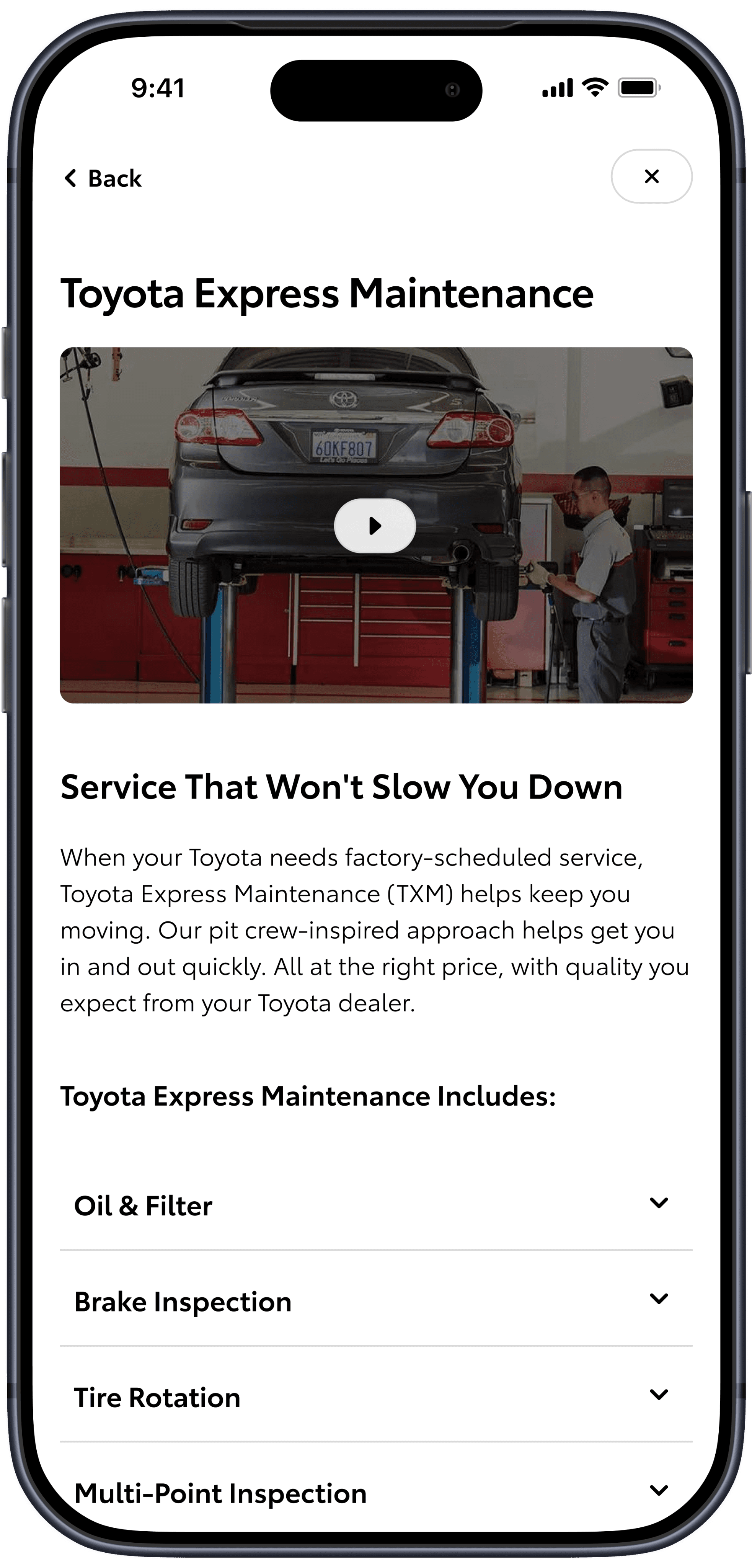
Express Maintenance Page
Final Interface
Client aligned with our recommended direction - the overlay modal map. Our final design helps users quickly find what they’re looking for by consolidating all location types, improving navigation, and simplifying the hierarchy and quantity of possible user actions.
MVP Feature List
01
Combined map and list view for mobile
06
Certified Collision Centers & Express Maintenance education pages
03
Filtering functionality and feature tags for multiple location types
02
Visit Website and Schedule Service CTA's (highest engagement)
04
Tabs for Sales, Service, and Parts-related information
05
Button to open address in third-party maps
Find a Dealer Map
Map Overlay Modal
Default view shows results on the left with the map on the right. Dealer cards show the dealer name, address, phone and if the dealer has SmartPath or Certified Collision. Exposed CTAs are “Visit Website” and “Schedule Service”. Users can pan the map, select pins or load additional dealers into view. Information on Service and Parts Centers tied to that dealership are located on the details page.
Mobile
For mobile, a collapsible tray for flexibility between map and list view allows the user multiple ways to view the experience.
Default Dealer Map
Expanded Dealer List
Dealership Tab
Service Center Tab
Filters
Marketing Page Touts
Certified Collision
Centers Page
Express Maintenance
Page
Takeaways and Next Steps
Takeaways and Next Steps
Following our MVP map launch, a 30-day A/B test comparing the old and new experiences showed overall positive impact. Among 74,000 users, the new map drove a 23% increase in dealer details page views, with a 12% lift in dealer phone number clicks and a 5% increase in schedule service clicks.
We're planning several post-MVP enhancements, including integration of EV Charging and Hydrogen Fuel Stations, adding custom dealer imagery, and embedding a dealer appointment scheduler into the experience.
One key retrospective learning is earlier alignment on the full scope of Toyota's location ecosystem, including the tiered dealer structure and the business/legal considerations that come with it - knowing these intricacies would have meaningfully shaped our design approach from the start. This project also highlighted how Toyota's relationship with its dealers differs from that of its consumers. These expectations and learnings will be prioritized and surfaced earlier in future projects.
Following our MVP map launch, a 30-day A/B test comparing the old and new experiences showed overall positive impact. Among 74,000 users, the new map drove a 23% increase in dealer details page views, with a 12% lift in dealer phone number clicks and a 5% increase in schedule service clicks.
We're planning several post-MVP enhancements, including integration of EV Charging and Hydrogen Fuel Stations, adding custom dealer imagery, and embedding a dealer appointment scheduler into the experience.
One key retrospective learning is earlier alignment on the full scope of Toyota's location ecosystem, including the tiered dealer structure and the business/legal considerations that come with it - knowing these intricacies would have meaningfully shaped our design approach from the start. This project also highlighted how Toyota's relationship with its dealers differs from that of its consumers. These expectations and learnings will be prioritized and surfaced earlier in future projects.